
Quick Guide
- Select an entrance or exit, not a Parking Bay.
- Use the Rate per minute slider in the gate panel.
- Revisit prices after the Carbrainess and needs lesson.
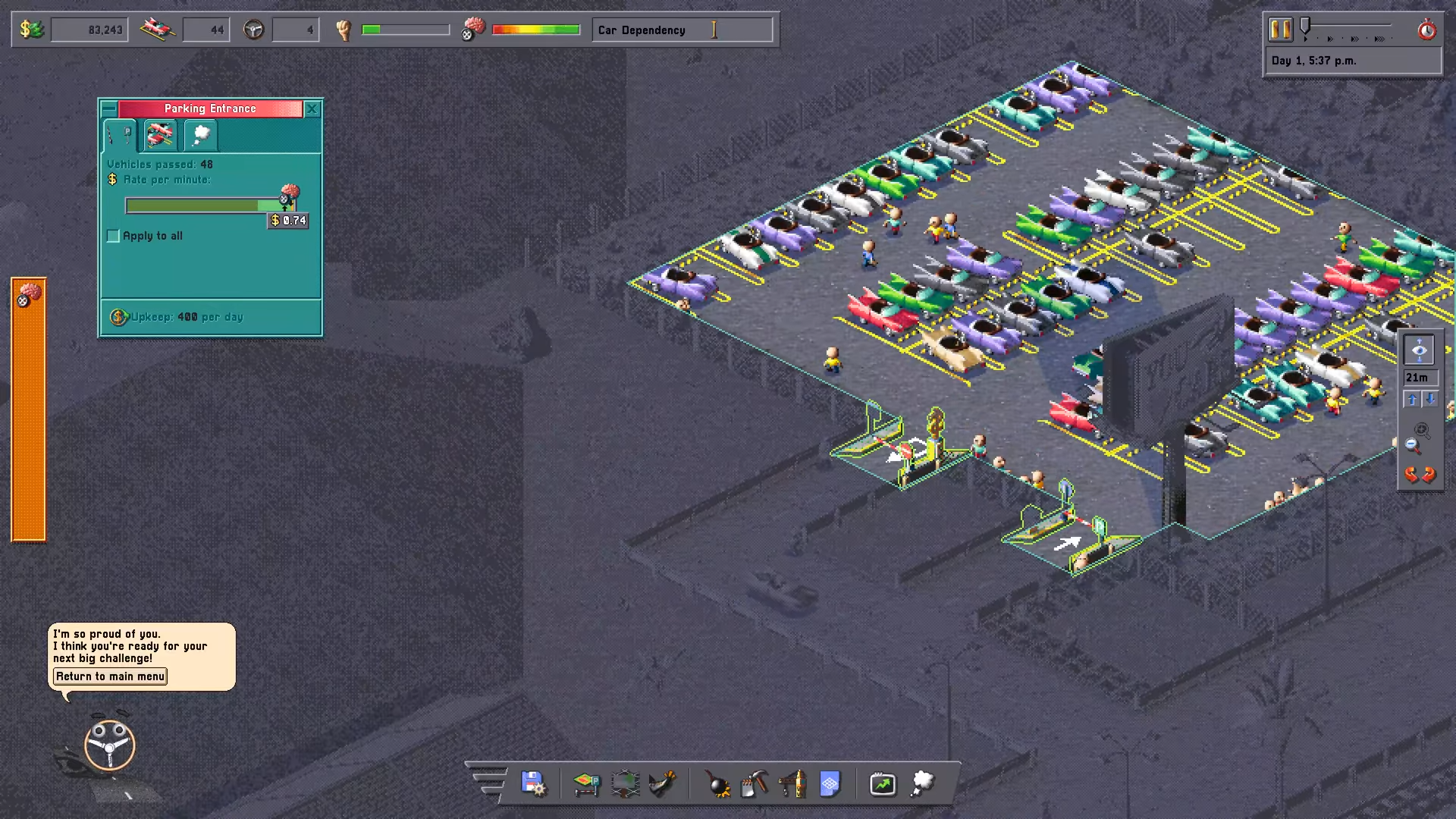
Zoidelle, 08:01. Native 1920×1080 gameplay frame; tutorial footage, exact build unknown.
Zoidelle · Source / open if playback failsTo change Car Park Capital parking fees, select the lot’s Parking Entrance or Parking Exit and adjust Rate per minute. Match the rate to driver willingness to pay rather than maximizing it blindly.
On this page
Car Park Capital parking fees: open the right control
Click the parking lot entrance or exit. The reviewed tutorial opens a Parking Entrance panel with a Rate per minute slider, Vehicles passed and an Apply to all checkbox. The pricing task is attached to the gate; selecting a bay opens a different object.
Move the rate slider to change the requested fee. The tutorial tells you to raise prices after improving driver needs, but also warns that charging above the average driver’s willingness to pay hurts the business. The control’s visible label is the useful reference if another build changes the panel layout.
Zoidelle tutorial, 06:50–08:05. Published 10 October 2026; exact recording date and build unknown. Open the source if the player is unavailable.
Zoidelle · Source / open if playback failsHow to choose a rate without a fake optimum
Higher Carbrainess allows higher prices according to the on-screen tooltip. That establishes the direction of the relationship; it does not supply a tested formula for the ideal rate. Start from the fee shown in your own run and make a considered adjustment after inspecting needs.
As a practical check, observe whether the working lot continues to receive cars after a change. If business deteriorates, reconsider the rate alongside demand and access. This is an observation-based adjustment method, not a promise that a particular price or slider position always restores traffic.
What the sample panel proves
The recorded panel has a rate control and a count of vehicles passed. Its fee and upkeep values belong to that one tutorial run. They are not recommended defaults for every city, and a vehicle counter alone is not a calculation of net profit.
Apply to all is visible, but this footage does not demonstrate its complete multi-lot behavior. Change the selected gate first; before using a bulk option, confirm the intended scope in your own interface.
If you cannot find the fee slider
Confirm that you selected the entrance or exit and opened its panel. If your lot is not functional yet, finish its asphalt, gate and bay placement before diagnosing income. If traffic remains poor after a price change, use the separate layout and demand guides to check those independent conditions.
A complete guide to all income sources, upkeep optimization and late-game profits requires additional evidence. This page answers the narrower task of finding and using the parking rate control.
Sources
Reviewed:
Tutorial footage published 10 October 2026; exact build and recording date unknown
Based on the first tutorial mission, its on-screen instructions and reviewed gameplay frames. Recheck if your tutorial, needs panel or pricing controls differ after an update.