
Quick Guide
- Pave the approach lane as well as the parking area.
- Rotate entrance and exit to match their opposite travel directions.
- Check real cars using bays; a placement preview does not prove access.
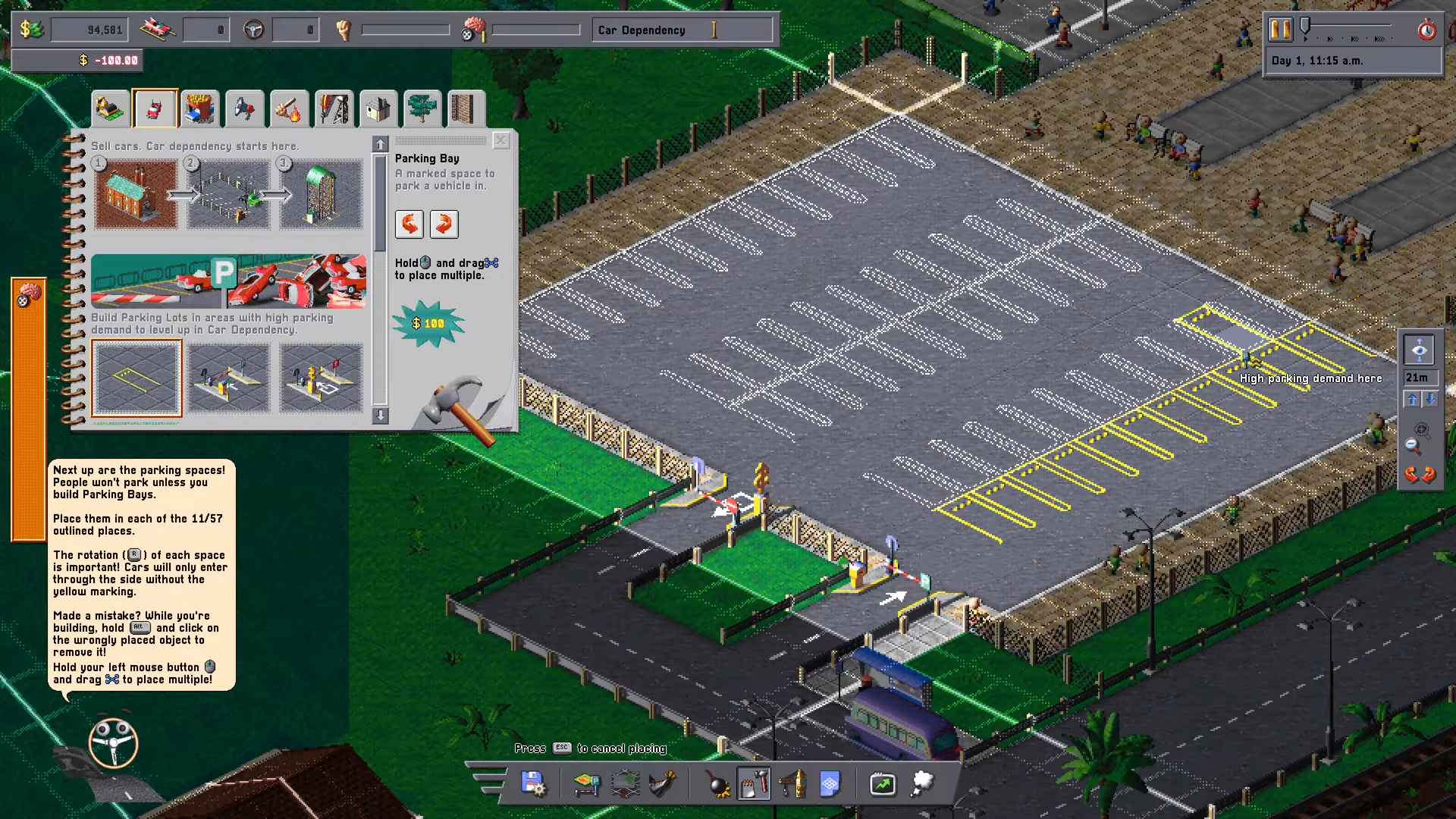
Zoidelle, 04:05. Native 1920×1080 gameplay frame; tutorial footage, exact build unknown.
Zoidelle · Source / open if playback failsA working Car Park Capital parking layout needs a paved route through the entrance, accessible bays and a separate exit. Face each bay’s unmarked side toward the driving aisle.
On this page
Car Park Capital parking layout: the access route
In the tutorial, the first plot sits directly in front of the amusement park. Clear the rocks, then fill the outlined area with Asphalt from the first build-catalog tab. Wheelie explains that cars do not go off-road, so the surfaces they must cross need a driveable road material.
Place the requested barriers around the paid parking area. Put Parking Entrance on the approach into the lot and Parking Exit on the route back out. Their direction matters: the tutorial explicitly asks you to rotate the exit the other way. Follow the arrows and the mission outlines instead of treating the two gates as interchangeable decorations.
Zoidelle tutorial, 02:55–04:45. Published 10 October 2026; exact recording date and build unknown. Open the source if the player is unavailable.
Zoidelle · Source / open if playback failsWhich way should Parking Bays face?
Select Parking Bays and rotate a bay so the side without the yellow marking opens onto a driveable aisle. That is the side cars use to enter. The screenshot shows rows with their unmarked ends meeting the open lanes; drawing tightly packed yellow rectangles without access can leave a bay unusable.
Use the tutorial’s outlined positions to practice before designing a larger lot. R is shown as the rotation control in this PC tutorial. Hold and drag to place several bays only after the first bay faces the correct way.
Check that the layout actually works
After construction, watch for a car entering through the gate and occupying a bay. The tutorial records a functional-lot message followed by multiple parked vehicles. Later, the entrance panel shows Vehicles passed, providing another observable signal of use.
If a new lot stays empty, review the paved route, gate arrows and the open side of each bay first. Then check Parking Demand Heatmap; geometrically accessible parking can still be placed where people do not want to park. This is a conditional check order, not a claim that every empty lot has a rotation fault.
Working layout versus maximum-capacity layout
The demonstrated arrangement proves a functioning tutorial lot. It does not establish the best space density, a universal aisle width or a profitable multi-floor garage design. Use the demand guide before buying another plot, then the fee guide once vehicles are using it.
Sources
Reviewed:
Tutorial footage published 10 October 2026; exact build and recording date unknown
Based on the first tutorial mission, its on-screen instructions and reviewed gameplay frames. Recheck if your tutorial, needs panel or pricing controls differ after an update.